Zero-JavaScript Landing Pages with React Router Prerendering
Use React Router prerendering to ship static marketing pages without the client runtime while keeping SPA app routes and SEO metadata.

I wanted the Extroid landing page to load like a plain HTML document.
The page has a headline, product copy, screenshots, a call to action, metadata, Open Graph tags, and JSON-LD. It does not need hydration, client-side routing, or a React runtime in the browser. It should be HTML and CSS.
But the product itself is still a React Router app. The app routes need JavaScript. They use browser APIs, offline behavior, camera permissions, WebRTC, connection state, and interactive UI. Splitting the landing page into a separate static site would work, but it would also create another build pipeline, another layout system, and another place to keep product metadata in sync.
So the target was narrower: keep one React Router project, prerender the public pages, and avoid shipping the client runtime where the page does not need it.
/           prerendered HTML, no client runtime
/privacy    prerendered HTML, no client runtime

/start      app route, scripts enabled
/connect    app route, scripts enabled
/exploit    app route, scripts enabled
The setup
I use an explicit React Router route config. A simplified version originally looked like this:
export default [
  layout('./components/shared/RootLayout.tsx', [
    index('./components/landing/LandingPage.tsx'),
    route('/privacy/', './components/privacy/PrivacyPage.tsx'),
    layout('./components/shared/OfflineLayout.tsx', [
      route('start', './components/start/StartPage.tsx'),
      route('connect', './components/connect/ConnectPage.tsx'),
      route('exploit', './components/exploit/ExploitPage.tsx'),
      route('*', './components/shared/NavigateToStart.tsx'),
    ]),
  ]),
] satisfies RouteConfig;
This works, but it makes LandingPage.tsx both the page component and the route module. For a regular app page, that is acceptable. For a public page, I wanted a cleaner boundary.
The route module owns framework-specific exports. The page component only renders the page. So I changed the route config to point to a small route wrapper:
export default [
  layout('./components/shared/RootLayout.tsx', [
    index('./components/landing/LandingRoute.tsx'),

    // Same stuff
  ]),
] satisfies RouteConfig;
LandingPage.tsx became pure UI:
export const LandingPage: React.FC = () => {
  return <main>{/* Landing page content */}</main>;
}
And LandingRoute.tsx became the adapter between the page and React Router:
export {LandingPage as default} from './LandingPage';
export {landingMeta as meta} from './landing.meta';
That small wrapper ended up being useful. The route file stays boring, the page component stays reusable, and metadata does not leak into the visual component.
Metadata belongs to the route
For the landing page, I wanted the document head to contain the usual SEO metadata plus JSON-LD: title, description, canonical URL, Open Graph tags, and structured data.
I keep that in landing.meta.ts:
import {seo} from '@extroid/common/constants';
import type {MetaFunction} from 'react-router';

const TITLE = 'Extroid – Use Your Phone as a Webcam in Browser Video Calls';
const DESCRIPTION = 'Use your phone as a webcam for browser video calls with fast QR pairing, no drivers, and no desktop apps';

export const landingMeta: MetaFunction = () => [
  {
    name: 'robots',
    content: 'index, follow',
  },
  {
    tagName: 'link',
    rel: 'canonical',
    href: seo.siteUrl,
  },
  {
    title: TITLE,
  },
  {
    name: 'description',
    content: DESCRIPTION,
  },
  {
    property: 'og:title',
    content: TITLE,
  },
  {
    property: 'og:description',
    content: DESCRIPTION,
  },
  {
    property: 'twitter:title',
    content: TITLE,
  },
  {
    property: 'twitter:description',
    content: DESCRIPTION,
  },
  {
    'script:ld+json': createLandingPageStructuredData(),
  },
];

function createLandingPageStructuredData() {
  return {
    '@context': 'https://schema.org',
    '@graph': [
      {
        '@type': 'WebSite',
        '@id': `${seo.siteUrl}#website`,
        name: 'Extroid',
        url: seo.siteUrl,
        inLanguage: 'en',
        publisher: {
          '@id': `${seo.siteUrl}#organization`,
        },
      },
      {
        '@type': 'Organization',
        '@id': `${seo.siteUrl}#organization`,
        name: 'Extroid',
        url: seo.siteUrl,
        logo: {
          '@type': 'ImageObject',
          '@id': `${seo.siteUrl}#logo`,
          url: seo.logoUrl,
          width: 512,
          height: 512,
        },
        sameAs: [seo.chromeStoreUrl, seo.productHuntUrl],
      },
      {
        '@type': 'WebPage',
        '@id': `${seo.siteUrl}#webpage`,
        url: seo.siteUrl,
        name: TITLE,
        description: DESCRIPTION,
        isPartOf: {
          '@id': `${seo.siteUrl}#website`,
        },
        about: {
          '@id': `${seo.siteUrl}#software`,
        },
        primaryImageOfPage: {
          '@id': `${seo.siteUrl}#logo`,
        },
        inLanguage: 'en',
      },
      {
        '@type': 'SoftwareApplication',
        '@id': `${seo.siteUrl}#software`,
        name: 'Extroid',
        alternateName: TITLE,
        url: seo.siteUrl,
        mainEntityOfPage: {
          '@id': `${seo.siteUrl}#webpage`,
        },
        description: DESCRIPTION,
        operatingSystem: 'Windows, macOS, Linux, ChromeOS, Android',
        applicationCategory: 'BrowserApplication',
        applicationSubCategory: 'Webcam software',
        browserRequirements: 'Requires a Chromium-based desktop browser.',
        softwareRequirements:
          'Chromium-based desktop browser, Android phone recommended, same Wi-Fi network recommended.',
        softwareVersion: '1.0',
        datePublished: '2026-04-27',
        author: {
          '@type': 'Person',
          name: seo.author,
          url: seo.about,
        },
        publisher: {
          '@id': `${seo.siteUrl}#organization`,
        },
        offers: {
          '@type': 'Offer',
          price: '0',
          priceCurrency: 'USD',
          availability: 'https://schema.org/InStock',
          url: seo.chromeStoreUrl,
        },
        downloadUrl: seo.chromeStoreUrl,
        installUrl: seo.chromeStoreUrl,
        image: {
          '@id': `${seo.siteUrl}#logo`,
        },
        screenshot: [
          `${seo.siteUrl}/screenshots/screen-1-v1.png`,
          `${seo.siteUrl}/screenshots/screen-2-v1.png`,
          `${seo.siteUrl}/screenshots/screen-3-v1.png`,
          `${seo.siteUrl}/screenshots/screen-4-v1.png`,
          `${seo.siteUrl}/screenshots/screen-5-v1.png`,
        ],
        sameAs: [seo.chromeStoreUrl, seo.productHuntUrl],
        inLanguage: 'en',
      },
    ],
  };
}
The nice part is that the page does not need to manually render a JSON-LD script. The route exports metadata, and the root layout renders it through React Router’s <Meta/>.
import {Links, Meta, Outlet} from 'react-router';

export default function RootLayout() {
  return (
    <html lang="en">
      <head>
        <meta charSet="utf-8" />
        <meta name="viewport" content="initial-scale=1, width=device-width" />
        <meta name="language" content="English" />
        <meta name="theme-color" content="#6180d3" />

        {/* Many other common metadata */}

        <Meta /> {/* 🤺 Page specific metadata */}
        <Links />
      </head>

      <body>
        <Outlet />
      </body>
    </html>
  );
}
At this point, the static page has proper metadata in the head. But it still has a bigger problem.
Prerendered HTML can still ship JavaScript
Prerendering gives you HTML. It does not automatically mean «no JavaScript». If the root layout renders <Scripts/>, the generated page still gets React Router client scripts. That is fine for /start, /connect, and other app routes. It is not useful for the landing page.
The first attempt was direct: prerender the pages, then cut scripts from the generated HTML. Not with regex. A parser-based version is still simple enough:
import {parse} from 'node-html-parser';
import fs from 'node:fs';
import path from 'node:path';

for (const file of ['index.html', 'privacy/index.html']) {
  const filePath = path.join('build/client', file);

  try {
    const rawHtml = fs.readFileSync(filePath, 'utf-8');
    const doc = parse(rawHtml, {comment: false});

    doc.querySelectorAll('script[src^="/assets/"]').forEach((el) => el.remove());
    doc.querySelectorAll('link[rel="modulepreload"]').forEach((el) => el.remove());

    fs.writeFileSync(filePath, doc.toString());
    console.info(`✔ Stripped external scripts & modulepreloads from ${file}`);
  } catch (error) {
    console.warn(`❌ Error while striping ${filePath}`, error);
  }
}
This is better than regex because it understands the document structure and can keep JSON-LD. It is still the wrong level of abstraction. The output broke. The browser showed only the loading state instead of the full page.
The mistake was assuming that anything inside a <script> tag was optional client runtime. In a prerendered React Router document, some inline scripts may be part of how the document is completed or restored. Once the page is already generated, a script stripper cannot reliably know which scripts are safe to remove and which ones are part of the rendering result.
The fix was not to delete scripts after the build. The fix was to prevent unnecessary scripts from being rendered for static routes.
The final version
The final version is a small wrapper around <Scripts/>.
import {MobileEnv} from '@extroid/mobile/utils/env';
import React from 'react';
import {Scripts, UNSAFE_FrameworkContext, useLocation} from 'react-router';

function ClientScripts() {
  const location = useLocation();
  const frameworkContext = React.useContext(UNSAFE_FrameworkContext);
  const isStaticPrerender = frameworkContext?.isSpaMode === false && MobileEnv.isStaticUrl(location.pathname);

  return isStaticPrerender ? null : <Scripts />;
}
And the root layout uses ClientScripts instead of Scripts directly:
export default function RootLayout() {
  return (
    <html lang="en">
      {/* Same stuff */}

      <body>
        <Outlet />
        <ClientScripts />
      </body>
    </html>
  );
}
This moves the decision into rendering, where route context still exists. Static prerendered public pages can return no client scripts. App routes still render the scripts they need.
The tradeoff is that this uses UNSAFE_FrameworkContext. I do not like that part, and I would rather not depend on an internal API. But keeping the usage isolated in one component is acceptable for this case, and it is less fragile than editing generated HTML after the build.
Headers and caching
Once public pages are static, the hosting side should avoid one common mistake: treating HTML like a versioned asset. HTML should stay easy to refresh. Fingerprinted assets can be cached aggressively. Public metadata files should be cached, but not forever.
The rule I use is:
HTML documents:
Cache-Control: no-cache

fingerprinted JS, CSS, images, fonts:
Cache-Control: public, max-age=31536000, immutable

robots.txt, sitemap.xml, manifest:
Cache-Control: public, max-age=3600
The exact hosting provider is not the interesting part. The useful distinction is between documents and assets. A document is the current page. A fingerprinted asset is a versioned file. They should not have the same cache policy.
Let’s check it
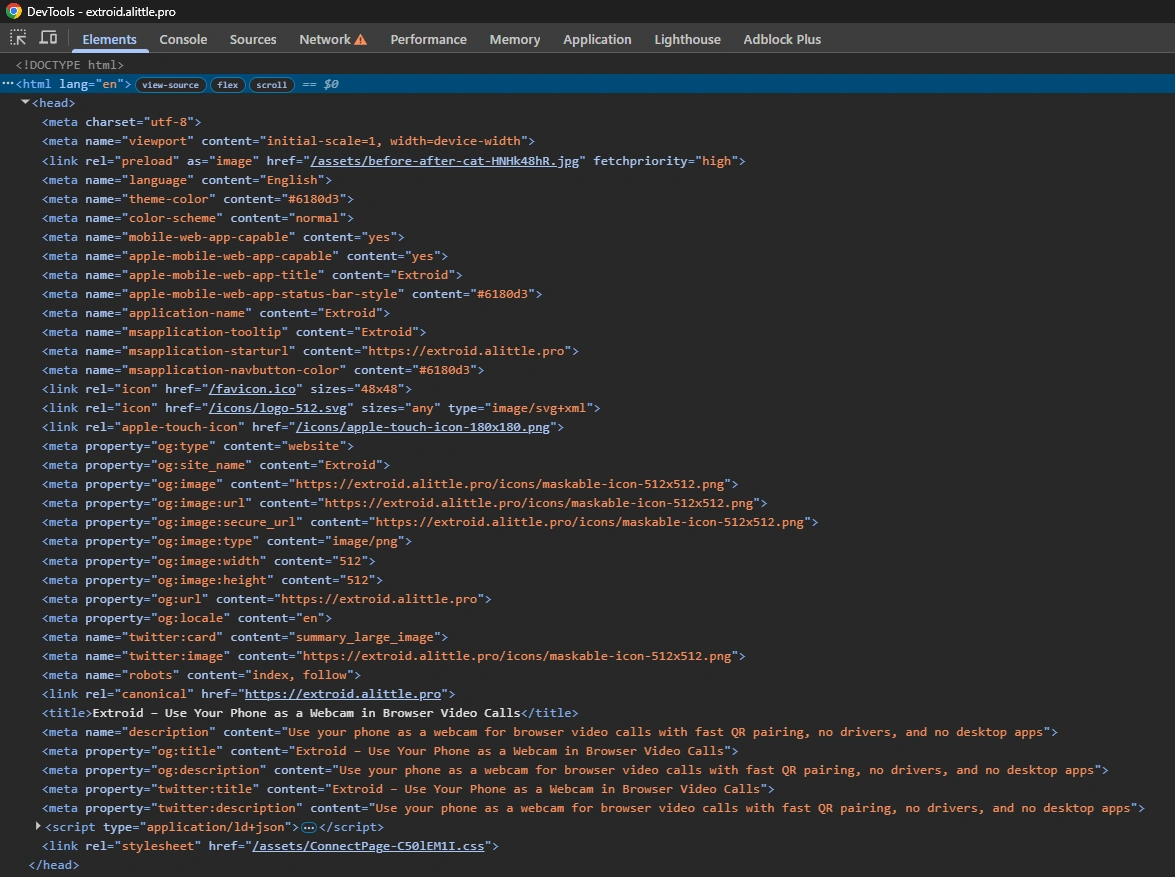
The quickest verification is to open the production page and view the HTML. For the landing page, I expect the source to contain real page content and the metadata I care about:
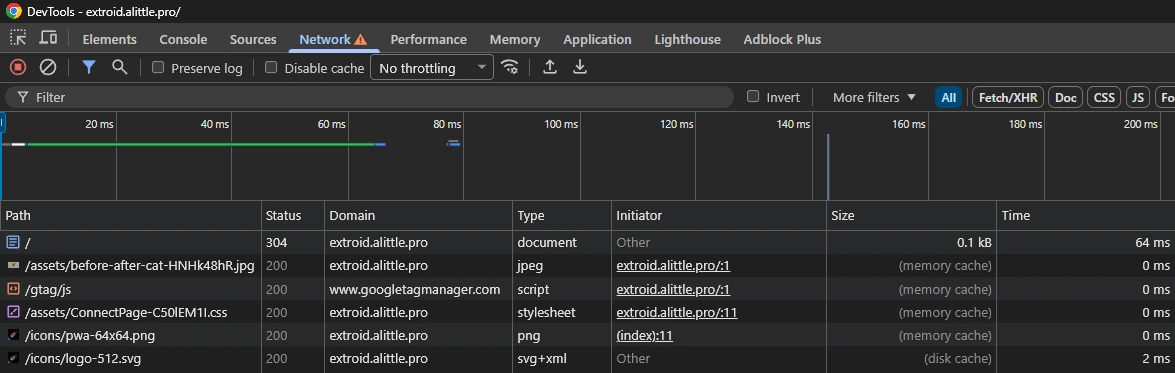
I also expect not to see a bundle of React Router client scripts on the static landing page.
Then I check the opposite on app routes. /start, /connect, and /exploit should still work normally. If the static page source is clean and the app routes still run, the split is correct.
Conclusion
The important lesson was the failed script stripping attempt. It is easy to look at generated HTML and think the solution is to delete scripts. Even with an HTML parser, that approach is blind. It happens after React Router has already produced the document, so it can remove things that are not safe to remove.
Conditional rendering is cleaner. The root layout decides whether scripts are needed while React Router still has enough context to make that decision.
For a hybrid product, this is a practical setup: one React Router project, static public pages, dynamic app routes, metadata in the head, and no unnecessary runtime cost on the landing page.